

How is WealthProbe Different?
WealthProbe is an affordable, secure, flexible alternative to financial advisors and other fee-based tools by providing goal-based planning software that enables you to analyze your unique situation. It does this by examining both your current and planned investments and spending patterns. You don’t need any additional skills, apart from knowing how to operate your own device. Examine your nest egg based on your own circumstances without depending on any general rules-of-thumb.
Affordable
WealthProbe costs less per year than similar tools and much less than the cost of hiring a financial consultant for 1 hour.
Secure
WealthProbe stores your data on your own device using banking-level encryption. You don’t have to worry about data breaches and hackers breaking into an advisor’s site. Plus your data file can only be accessed by the device that created it. Even if somebody owns a copy of WealthProbe and steals your data file to examine on another device, they can not read your data file. Only your device has the key to unlock your data.
Flexible
Configure inputs based on your own unique situation and assumptions. Use pre-existing investment types and categories or create your own if desired. Easily change parameters you are unsure of to see their effects on your results. See a full list of features here.
Purchase with Confidence
Your visit to our website, and anything uploaded or downloaded while there, is encryption-protected using the Secure Sockets Layer (SSL) Protocol (seen as https:// and the padlock symbol).
Your satisfaction is guaranteed. If, for any reason, you aren’t satisfied with WealthProbe, we will refund your money at any time within 30 days of purchase.
What are You Waiting For?
Take control of your financial future now! Find out today when you can afford to retire or how you need to adjust your strategy to meet your goals. If you wait, you might miss out on opportunities to maximize your financial freedom.
Some Examples of WealthProbe Insights Plus Answers to Common Questions
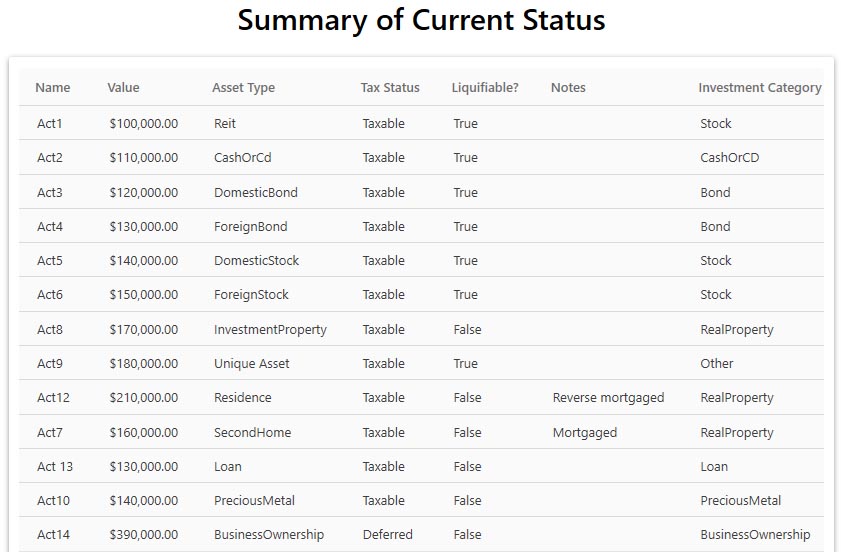
Summary of Current Status:
WealthProbe has been designed to give you maximum flexibility. As an example,
WealthProbe includes several different asset types, as shown in this listing. Individual assets and
accounts are entered as one of the asset types shown. You can enter as many assets as you'd like in the asset types. This includes 'Second Homes' and 'Investment Properties', but you can have only one 'Residence'.
Note in this example there is an asset type the user has called ‘Unique Asset’. This is an asset type the user has decided does not fit into any of the
standard WealthProbe asset types. For example, you might call your unique asset type ‘Collectibles’. WealthProbe makes the creation of this new asset type easy. As
with the other asset types, you can input as many individual assets as you want in your Collectibles asset type, e.g. coin
collection, a work of art, an antique car, etc. Unlike the standard asset types, you determine whether your unique asset type is volatile and whether it is
readily liquifiable.
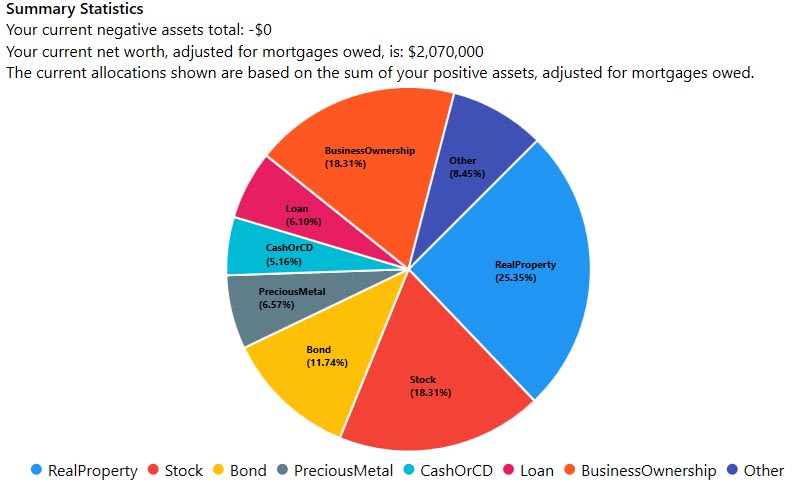
Summary Statistics:
The pie chart depicts how this user is currently invested across the WealthProbe ‘Investment Categories’. These categories contain one or more asset types. For example, the ‘RealProperty’ investment category contains the Residence, SecondHome, and InvestmentProperty asset types. Later you will use these Investment Categories to enter the allocations and returns (your investment plan), one of the things WealthProbe will use to calculate your wealth as a function of time. Since this scenario had a ‘Unique Asset’ the user determined didn’t fit into an existing investment category, it became its own investment category called ‘Other’. So 8.45% of this user's current assets are in invested in the ‘Other’ investment category representing the user defined ‘Unique Asset’ asset type. The summary just above the pie chart shows the net worth of the user at the time data was input into WealthProbe, adjusted for negative accounts and mortgages. Asset values in the pie chart have been adjusted downward for the mortgages owed.

Cash Flow Analysis
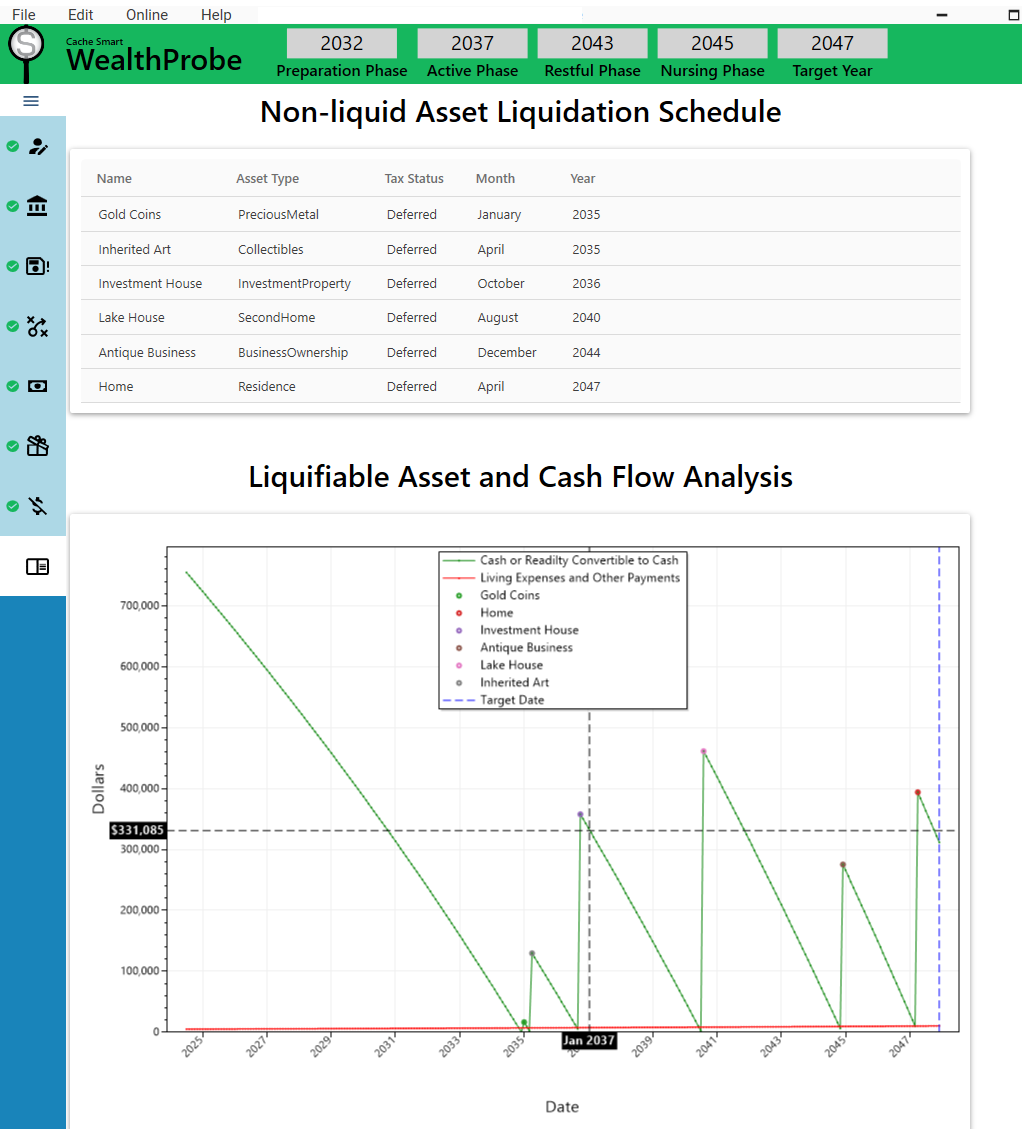
This chart shows the result of a simple scenario designed to illustrate WealthProbe’s analysis of cash flow. Your ability to pay all expenses is monitored on a month-by-month basis. This curve looks much different than the next one since it is focused only on cash available to pay the bills.
If you run out of cash from savings and income, and have no more assets that are readily convertible to cash, WealthProbe will bring this to your attention and list all of your non-liquid assets. It’s up to you to choose which asset to sell each time this happens.
When a non-liquid asset is sold, the available cash suddenly increases by the value of the asset when it was liquidated. In this scenario, the user chose to liquidate the non-liquid assets in the order shown in the Liquidation Schedule. This schedule allows the user to plan head and prepare for the need to sell each non-liquid asset.
In this particular case the user makes it to their Target Date of December 2047, but needs to sell their home in April of that year to get through the year. The user might decide this is acceptable by planning to move in with a friend or relative. Or they might decide to make some changes to their current plans (perhaps working a bit longer or cutting planned expenses) so that they can make it to their Target Date without the need to sell their house at all.
Wealthprobe is designed to allow for easy ‘what-if’ analysis so the user can investigate all their options.
Note that the cursor has been placed on the cash curve corresponding to January 2037, the first month of this user’s retirement, showing the corresponding amount of cash and readily liquifiable assets available at that time. The amount of cash and liquifiable assets available, or the expense at any particular month, can be shown by positioning the cursor over the relevant date on the appropriate curve during WealthProbe execution.
Net Worth Analysis
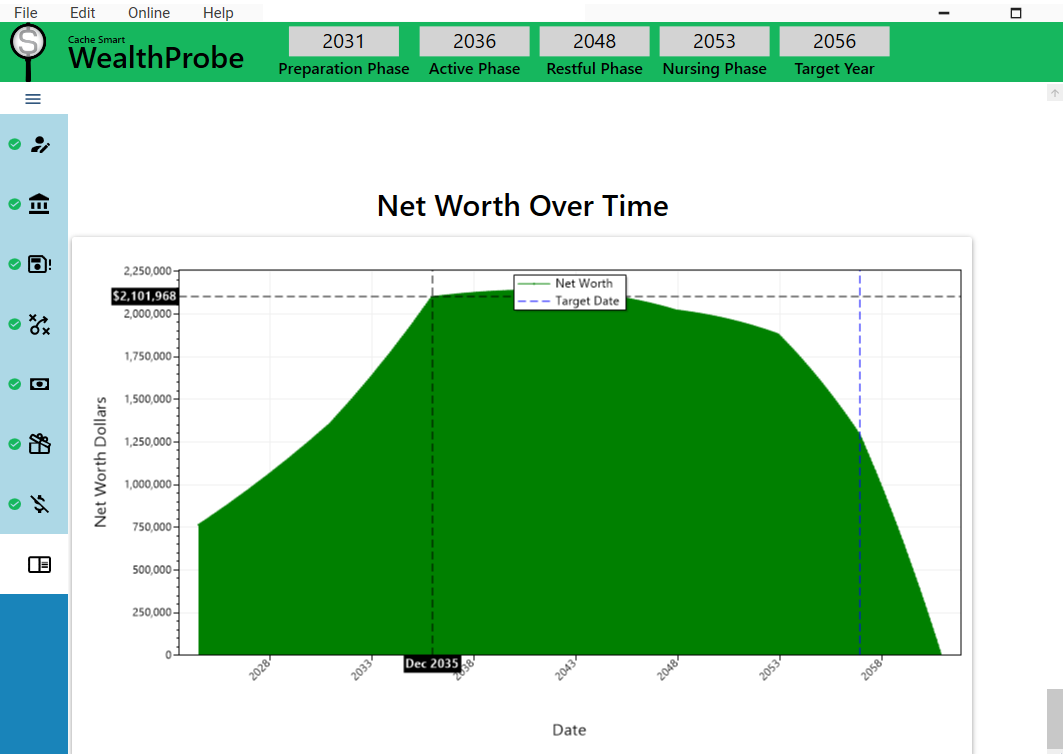
This shows an example of the monthly Net Worth as a function of time, one of the results shown by WealthProbe. This scenario is different from the previous one, with a Target Date of December 2056. Notice the net worth escalates at an increasing rate during this user’s working and preparation phases (due to raises) until the user stops working in December of 2035, just before retiring in January 2036 (the start of their Active retirement phase).
This user assumes expenses will decrease in their Restful phase (starting 2048) so the net worth decreases at a slower rate in than in the previous Active phase. The user then assumes the Nursing phase (starting in 2053) will be much more expensive.
This user makes it to their Target Date when the estate is worth almost $1.3 million, a nice estate to leave to the heirs of the estate. The cursor has been placed on the month before retirement, showing the calculated value of the estate at that time. The estate value at any month can be obtained by placing the cursor on the top of the curve at the desired month during WealthProbe execution.
WealthProbe continued the calculation past the user’s Target Date and found that, given the user’s inputs and assumptions, the estate would last until December 2060.WealthProbe explores your estate based on your desires and inputs.
Your assessment of how long your nest egg needs to last
Your current and planned income
Your current wealth by asset type
Your Tax-Deferred and Tax-Exempt IRAs
Your assumptions
Your current and expected expenses
Your future investment allocations and estimated returns
Five distinct phases to cover your lifelong retirement plan with the flexibility you need.
Common Questions:
No. You have the option to download immediately after purchase while still on the website or at a later, more convenient time using the link on your purchase confimation email.
During data entry most of your inputs can be changed allowing what-if analysis. You can even re-load the data file of a completed scenario and do what-if analysis on it. Once you have made the changes and press ‘Continue’ for the section, the changes will be saved and upon entering the Results section, WealthProbe will show you the effect of the changes on your outcome.
You provide your current and planned expenses, current assets, investment plans, current and planned income streams, and certain assumptions such as rates of return and inflation. WealthProbe uses this information to calculate your total wealth on a month-by-month basis. This information is output in the Results section. In addition, WealthProbe tells you the date you run out of money if that happens before your Target Date (your Target Date is December of the year through which you need the support of your nest egg). If you make it to your Target Date, WealthProbe provides your net worth at the Target Date, and continues calculating to the date your wealth runs out. If your wealth will last until your 120th birthday, WealthProbe shows the net worth of your estate at that point.
The only time WealthProbe needs to be connected to the internet is upon first usage on your device. This is to activate the license to use the software on that device. After that, no external communication takes place between WealthProbe and the outside world, except if you need to reactivate WealthProbe (when, for example, you replace your previous device) or when you elect to download an update. In fact, you can disconnect your computer from the internet if you wish while using WealthProbe. When you enter your data into WealthProbe, your data files are encrypted and stored on your own device or detachable drive. Only your device has the encrypted key to unlock these data files when you need them again.
After WealthProbe performs its calculations based on the data and plan you input, if you do not make it to your planned Target Date, WealthProbe will tell you the year you run out of money and gives suggestions on how to change your plan, including working a little longer. The ‘what-if’ analysis feature allows you to change individual inputs, allowing you to analyze your new plan as needed.
WealthProbe tracks your cash, and assets that are readily convertible to cash, in order to monitor your ability to pay the bills. If you will run out of cash, WealthProbe tells you when and shows you a listing of all your available non-liquid assets. You will choose one of these assets to liquidate and give your estate a cash infusion. This will happen as often as necessary until you either run out of assets or make it to your Target Date. WealthProbe gives a summary of the non-liquid assets you chose to liquidate, and when you needed to liquidate them, as part of the final report in the results section. This listing gives you useful planning information pertaining to when you may need to consider selling individual assets in the future.
WealthProbe provides a summary of the name, asset type, and current value of all the assets you input – WealthProbe never asks for account numbers or passwords, thus cannot list them. However, the summary it provides is a single place for your executor to go to find a listing of all your assets. This eliminates the requirement for the person in charge of your estate to painstakingly search your records trying to locate all of your assets, and potentially missing some of them.
Prior to retiring, most people are focused on saving as much as they can for retirement. Once they retire, this suddenly changes. Instead of saving, most people must start spending down their nest egg. During retirement, options for spending money are constantly arising, such as traveling, buying a boat, or helping a relative financially. Many retirees find it hard to spend this extra money, fearing how it might affect their ability to fund their retirement years. They might avoid a great trip abroad because they don’t want to spend the money without knowing the degree of impact on their finances. WealthProbe shows the effects of spending money on these types of non-essential items. Running the option through WealthProbe will show its impact on the user’s wealth results. By having the facts, the retiree has gained the freedom of making a more informed decision – and possibly the freedom to enjoy their hard-earned retirement years more fully.
Recent analysis shows that assumptions considered ‘typical’ by most investment calculators represent less than 5% of people. When it comes to retirement planning, one size does not fit all. Among many other capabilities, WealthProbe allows you to account for your health in determining your Target Year; not only allows for bequests, but allows them to be started and stopped according to your wishes while offering you 5 different disbursement frequencies to choose from; and you can start your social security any time you like. As you investigate, you will find this just scratches the surface of the flexibility you will find inherent in WealthProbe. In fact, WealthProbe analyzes your own unique situation without using any ‘typical’ retirement rules-of-thumb.
Operating System Note
WealthProbe is compatible with devices using all Microsoft-supported versions of Windows 10 and later. If you are operating an earlier version of Windows, we recommend upgrading your operating system before installing WealthProbe. If you are purchasing from a mobile device, you can download WealthProbe later using the link on your purchase confirmation email.
We are excited to develop the version of WealthProbe compatible with Apple operating systems. If you have a device that uses an Apple operating system and think you might be interested in WealthProbe, we can notify you when the Apple-compatible version becomes available. Please use the link: Apple Users and indicate that you are an Apple user in the subject line.”